

Searching for a way to activate Windows 11 with KMS? You will find hundreds of pages promising it “for free”. This guide is different: it shows exactly how KMS activation works for Windows 11, the official Microsoft keys, the commands IT teams actually use, and how to fix the errors that stop it. And if you are a home user, it tells you straight which options are legal.
First, the honest answer: is KMS activation free and legal?
KMS (Key Management Service) is a legitimate Microsoft technology, and the keys below are published by Microsoft itself. But KMS is only legal in one situation: your organisation owns volume licences for Windows 11, and the computers activate against a KMS host that your organisation runs with its own KMS host key.
So KMS is not a free licence. It is the delivery mechanism for licences an organisation has already paid for. That rules out the shortcuts you will find elsewhere:
- Public KMS servers on the internet activate strangers’ PCs without a licence. That is licence circumvention, no matter who runs the server.
- “KMS activator” tools (KMSpico and friends) do the same thing locally, and many of them ship with malware, disable Windows Defender or add scheduled tasks you never asked for.
- Generic KMS keys alone do nothing. A GVLK only tells Windows “look for a KMS host”; without your own host, activation simply fails.
If you are an IT admin with volume licensing, everything in this guide is exactly what Microsoft documents. If you are a home user, skip to the section on legal options. There are cheaper and safer routes than you might think.
RooSho
How KMS activation works, in 60 seconds
- Your organisation installs a KMS host (the Volume Activation Services role on Windows Server) and activates it once with a KMS host key from the Microsoft 365 admin center (formerly VLSC).
- Volume-licensed Windows and Office installs come with a GVLK (Generic Volume License Key), which makes them KMS clients.
- Clients find the host automatically through a DNS SRV record (
_vlmcs._tcp) or a manually set address, and talk to it on TCP port 1688. - The host only starts activating once it has seen enough clients: 25 for Windows client, 5 for Windows Server and Office.
- Each activation lasts 180 days, and clients quietly renew every 7 days while they can reach the host.
Which Windows 11 editions can use KMS?
Only volume-licensable editions: Pro, Pro for Workstations, Education, Enterprise and their N/G variants. Windows 11 Home cannot be activated with KMS at all. There is no Home GVLK, and any page listing one is wrong.
Official Windows 11 KMS client keys (GVLKs)
These keys are published by Microsoft. They are not licences: they only switch Windows into KMS-client mode so it can activate against your organisation’s KMS host.
| Edition | GVLK |
|---|---|
| Windows 11 Pro | W269N-WFGWX-YVC9B-4J6C9-T83GX |
| Windows 11 Pro N | MH37W-N47XK-V7XM9-C7227-GCQG9 |
| Windows 11 Pro for Workstations | NRG8B-VKK3Q-CXVCJ-9G2XF-6Q84J |
| Windows 11 Pro for Workstations N | 9FNHH-K3HBT-3W4TD-6383H-6XYWF |
| Windows 11 Pro Education | 6TP4R-GNPTD-KYYHQ-7B7DP-J447Y |
| Windows 11 Pro Education N | YVWGF-BXNMC-HTQYQ-CPQ99-66QFC |
| Windows 11 Education | NW6C2-QMPVW-D7KKK-3GKT6-VCFB2 |
| Windows 11 Education N | 2WH4N-8QGBV-H22JP-CT43Q-MDWWJ |
| Windows 11 Enterprise | NPPR9-FWDCX-D2C8J-H872K-2YT43 |
| Windows 11 Enterprise N | DPH2V-TTNVB-4X9Q3-TJR4H-KHJW4 |
| Windows 11 Enterprise G | YYVX9-NTFWV-6MDM3-9PT4T-4M68B |
| Windows 11 Enterprise G N | 44RPN-FTY23-9VTTB-MP9BX-T84FV |
| Windows 11 Enterprise LTSC 2024 | M7XTQ-FN8P6-TTKYV-9D4CC-J462D |
| Windows 11 Enterprise N LTSC 2024 | 92NFX-8DJQP-P6BBQ-THF9C-7CG2H |
How to activate Windows 11 against your organisation’s KMS host
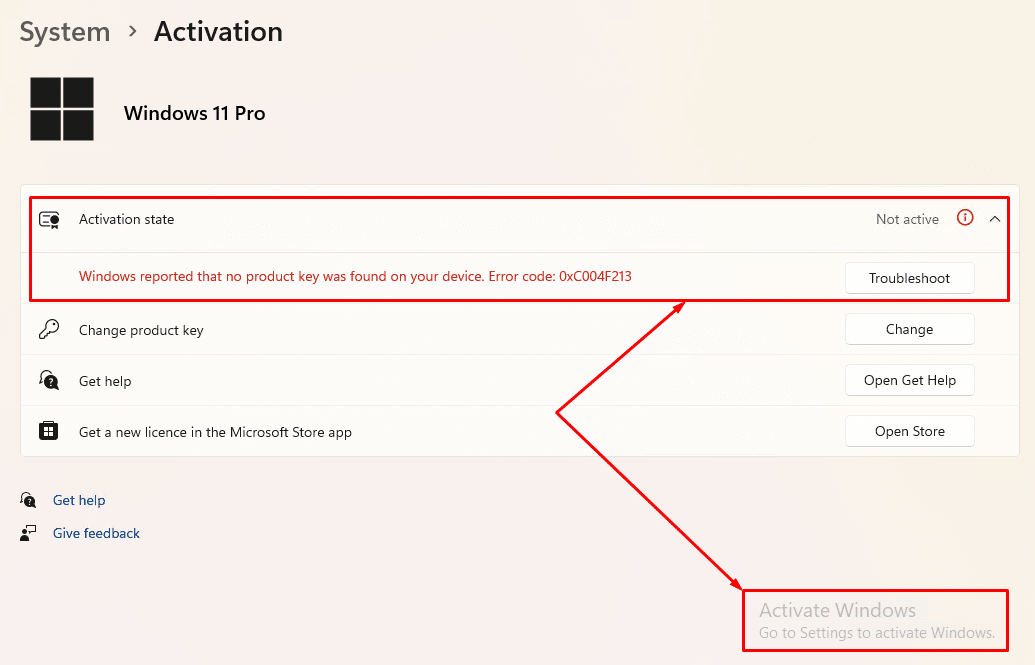
Step 1: Check the current activation status
Open Settings › System › Activation. Note the edition, because the key you install must match it.
Step 2: Open Command Prompt as administrator
Search for cmd, right-click Command Prompt and choose Run as administrator. Without elevation, every slmgr command fails with error 0x80070005.

Step 3: Install the GVLK for your edition
Volume-licensed installs usually already have it. You only need this step if the PC was installed from retail media or used a MAK before. Example for Pro:
slmgr /ipk W269N-WFGWX-YVC9B-4J6C9-T83GXStep 4: Point the client at your KMS host (only if DNS discovery is off)
In a domain with KMS auto-publishing, clients find the host by themselves and you can skip this. Otherwise, set it manually. Replace kms01.corp.example with your own host:
slmgr /skms kms01.corp.example:1688To go back to automatic DNS discovery later, clear the manual setting:
slmgr /ckmsStep 5: Activate and verify
slmgr /atoslmgr /dlvIn the /dlv output, look for License Status: Licensed and the name of your KMS host. You will also see the remaining activation interval, which resets to 180 days on every successful renewal.
Fixing the most common KMS activation errors
These are the error codes I see most often in the field, with the fix Microsoft documents for each one.
| Error | What it means | Fix |
|---|---|---|
0xC004F074 | No KMS host could be contacted. | Check DNS and port 1688 to your KMS host, then read Event ID 12288 in the Application log for the real reason. |
0x8007232B | DNS name does not exist: no _vlmcs._tcp SRV record found. | Publish the SRV record, or point the client at the host with slmgr /skms. No KMS host? Use a MAK or retail key instead. |
0x8007007B | Also a DNS lookup failure for the KMS SRV record. | Same fix as 0x8007232B; confirm the client uses your internal DNS servers. |
0xC004F038 | KMS count is too low. | The host needs 25 Windows clients (5 for Server/Office) before it activates anyone. Check the count with slmgr /dli on the host. |
0xC004F06C | Request timestamp invalid. | The client clock is too far from the host clock. Sync time with NTP or your domain controllers. |
0xC004F042 | This KMS host cannot activate this product. | The client reached the wrong host (common with separate Office and Windows hosts). Point it at the correct one. |
0xC004F050 | Product key invalid. | Wrong GVLK for this edition, a typo, or the clipboard turned hyphens into dashes. Retype the key. |
0x80070005 | Access denied. | Run Command Prompt as administrator. |
0xC004F213 | No product key found on this device. | Typical after a motherboard change or a fresh install. Sign in with the Microsoft account linked to your digital licence, or enter your product key. |
Two quick checks that solve most KMS problems
Can the client find the host in DNS?
nslookup -type=srv _vlmcs._tcp.corp.exampleCan it reach the host on port 1688?
Test-NetConnection kms01.corp.example -Port 1688Not an organisation? Your legal options for Windows 11
Here is what I tell friends who ask me for “a free KMS server”. Every option below is legitimate, and several cost nothing.
- Run Windows 11 unactivated. It keeps working and keeps getting security updates. You get a watermark and lose some personalisation settings, which is a fair trade for a test machine or a spare PC.
- Check for a digital licence. If the PC ever ran activated Windows, sign in with the same Microsoft account and run the Activation troubleshooter. Many “unactivated” machines reactivate on their own.
- Look at the sticker or firmware. Most branded laptops and desktops have an OEM key embedded in the firmware, which Windows picks up automatically on a clean install of the same edition.
- Use the free upgrade path. A genuinely activated Windows 10 PC upgrades to Windows 11 at no cost if the hardware qualifies.
- Buy from a legitimate source. The Microsoft Store, the PC maker or an authorised reseller. Very cheap “lifetime” keys from marketplaces are often resold volume or MAK keys that get blocked later.
- Evaluate before you buy. Microsoft offers time-limited Enterprise evaluation editions for testing.
Full practical flow (copy-paste)
For an IT admin activating a volume-licensed Pro machine against an internal host, the whole job is four lines in an elevated prompt:
:: 1. install the Pro GVLK (skip if already volume media)
slmgr /ipk W269N-WFGWX-YVC9B-4J6C9-T83GX
:: 2. point at your own KMS host (skip if DNS SRV works)
slmgr /skms kms01.corp.example:1688
:: 3. activate
slmgr /ato
:: 4. confirm "License Status: Licensed"
slmgr /dlv
Can I activate Windows 11 for free with KMS?
Only if your organisation already owns volume licences and runs its own KMS host. KMS delivers licences you have paid for; it is not a free licence. Public KMS servers and activator tools are licence circumvention.
Is there a KMS key for Windows 11 Home?
No. Microsoft publishes GVLKs only for volume-licensable editions such as Pro, Education and Enterprise. Home edition cannot use KMS.
Are KMS activator tools like KMSpico safe?
No. Besides being licence circumvention, many of them are bundled with malware, disable security software or add persistent scheduled tasks. Treat any PC that ran one as compromised.
How long does KMS activation last on Windows 11?
180 days. Clients try to renew every 7 days while they can reach the KMS host, so in a normal office network the timer never runs out.
Why do I get error 0xC004F074?
The client could not contact a working KMS host. Check that the _vlmcs._tcp SRV record exists, that TCP port 1688 is open to the host, and that client and host clocks are in sync.
Related guides


