

KMS is how most organisations activate Windows Server at scale: install once, and every volume-licensed server on the network activates itself. This guide covers the official Microsoft keys for Windows Server 2025, 2022 and 2019, the exact commands, setting up a KMS host, and the fixes for the errors that block activation.
First, the honest answer: is KMS activation free and legal?
KMS (Key Management Service) is a legitimate Microsoft technology, and the keys below are published by Microsoft itself. But KMS is only legal in one situation: your organisation owns volume licences for Windows Server, and the computers activate against a KMS host that your organisation runs with its own KMS host key.
So KMS is not a free licence. It is the delivery mechanism for licences an organisation has already paid for. That rules out the shortcuts you will find elsewhere:
- Public KMS servers on the internet activate strangers’ PCs without a licence. That is licence circumvention, no matter who runs the server.
- “KMS activator” tools (KMSpico and friends) do the same thing locally, and many of them ship with malware, disable Windows Defender or add scheduled tasks you never asked for.
- Generic KMS keys alone do nothing. A GVLK only tells Windows “look for a KMS host”; without your own host, activation simply fails.
If you are an IT admin with volume licensing, everything in this guide is exactly what Microsoft documents. If you are a home user, skip to the section on legal options. There are cheaper and safer routes than you might think.
RooSho
How KMS activation works, in 60 seconds
- Your organisation installs a KMS host (the Volume Activation Services role on Windows Server) and activates it once with a KMS host key from the Microsoft 365 admin center (formerly VLSC).
- Volume-licensed Windows and Office installs come with a GVLK (Generic Volume License Key), which makes them KMS clients.
- Clients find the host automatically through a DNS SRV record (
_vlmcs._tcp) or a manually set address, and talk to it on TCP port 1688. - The host only starts activating once it has seen enough clients: 25 for Windows client, 5 for Windows Server and Office.
- Each activation lasts 180 days, and clients quietly renew every 7 days while they can reach the host.
Official Windows Server KMS client keys (GVLKs)
| Version | Edition | GVLK |
|---|---|---|
| Windows Server 2025 | Standard | TVRH6-WHNXV-R9WG3-9XRFY-MY832 |
| Windows Server 2025 | Datacenter | D764K-2NDRG-47T6Q-P8T8W-YP6DF |
| Windows Server 2025 | Datacenter: Azure Edition | XGN3F-F394H-FD2MY-PP6FD-8MCRC |
| Windows Server 2022 | Standard | VDYBN-27WPP-V4HQT-9VMD4-VMK7H |
| Windows Server 2022 | Datacenter | WX4NM-KYWYW-QJJR4-XV3QB-6VM33 |
| Windows Server 2019 | Standard | N69G4-B89J2-4G8F4-WWYCC-J464C |
| Windows Server 2019 | Datacenter | WMDGN-G9PQG-XVVXX-R3X43-63DFG |
Running an Evaluation edition? Convert it to the full edition first (see the related guide below). A GVLK will not activate an evaluation install.
How to activate Windows Server against your KMS host
Step 1: Check the edition and status
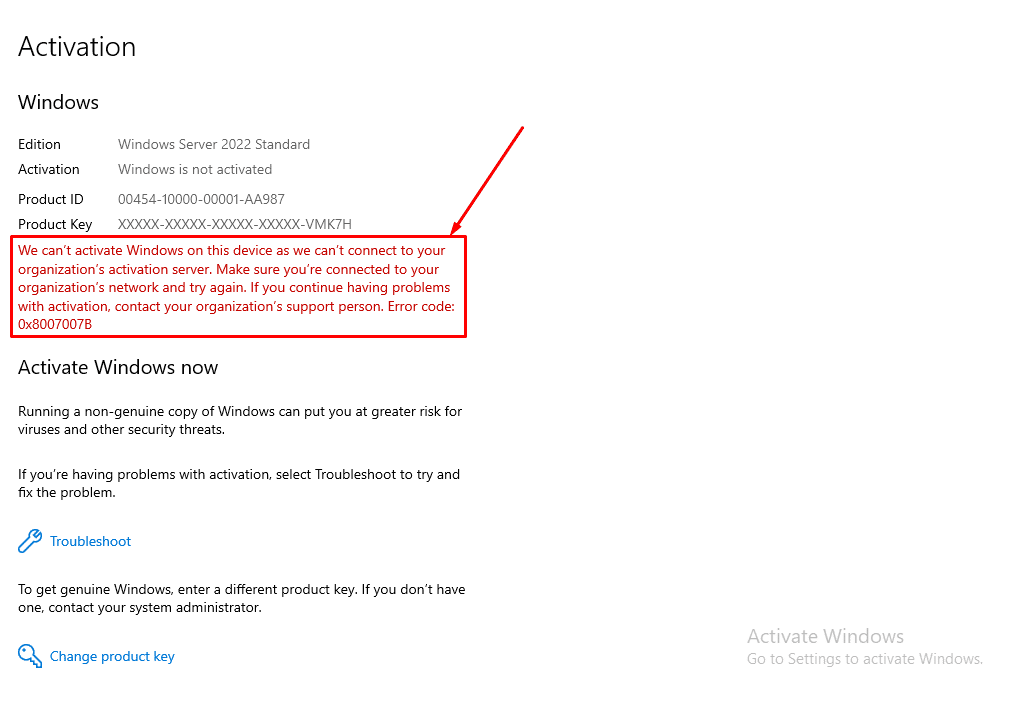
Or from the command line, which also shows whether the install is an evaluation:
slmgr /dlvStep 2: Open an elevated Command Prompt
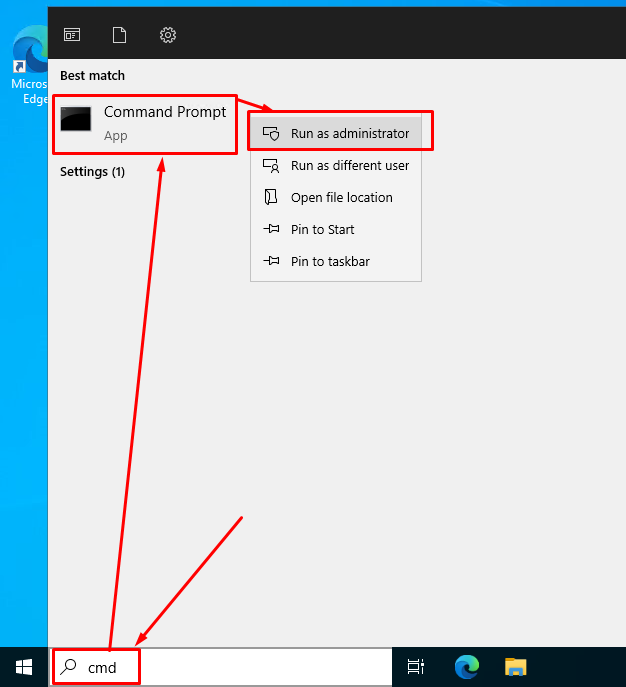
Step 3: Install the GVLK for your edition
Example for Windows Server 2022 Standard:
slmgr /ipk VDYBN-27WPP-V4HQT-9VMD4-VMK7HStep 4: Point it at your KMS host and activate
slmgr /skms kms01.corp.example:1688
slmgr /ato
slmgr /dlv
Look for License Status: Licensed. Remember that the KMS host must have seen at least 5 server activation requests before it starts activating; the first few servers in a new environment can report error 0xC004F038 until the count is reached.
Setting up the KMS host itself (the part most guides skip)
- Get your KMS host key (CSVLK) from the Microsoft 365 admin center: Billing › Your products › Volume licensing. Only volume licensing admins can see it.
- On a Windows Server, install the Volume Activation Services role and run the Volume Activation Tools wizard.
- Enter the host key and activate it online (or by phone). One host key for the newest Windows Server version also activates older Server and client versions.
- Allow TCP 1688 inbound on the host (the built-in “Key Management Service” firewall rule).
- Leave DNS publishing on so the host registers its
_vlmcs._tcpSRV record, or, in an Active Directory forest, consider Active Directory-based activation, which needs no separate host or count threshold.
Check the host is working at any time:
slmgr /dlv allFixing the most common KMS activation errors
These are the error codes I see most often in the field, with the fix Microsoft documents for each one.
| Error | What it means | Fix |
|---|---|---|
0xC004F074 | No KMS host could be contacted. | Check DNS and port 1688 to your KMS host, then read Event ID 12288 in the Application log for the real reason. |
0x8007232B | DNS name does not exist: no _vlmcs._tcp SRV record found. | Publish the SRV record, or point the client at the host with slmgr /skms. No KMS host? Use a MAK or retail key instead. |
0x8007007B | Also a DNS lookup failure for the KMS SRV record. | Same fix as 0x8007232B; confirm the client uses your internal DNS servers. |
0xC004F038 | KMS count is too low. | The host needs 25 Windows clients (5 for Server/Office) before it activates anyone. Check the count with slmgr /dli on the host. |
0xC004F06C | Request timestamp invalid. | The client clock is too far from the host clock. Sync time with NTP or your domain controllers. |
0xC004F042 | This KMS host cannot activate this product. | The client reached the wrong host (common with separate Office and Windows hosts). Point it at the correct one. |
0xC004F050 | Product key invalid. | Wrong GVLK for this edition, a typo, or the clipboard turned hyphens into dashes. Retype the key. |
0x80070005 | Access denied. | Run Command Prompt as administrator. |
0xC004F213 | No product key found on this device. | Typical after a motherboard change or a fresh install. Sign in with the Microsoft account linked to your digital licence, or enter your product key. |
Two quick checks that solve most KMS problems
Can the client find the host in DNS?
nslookup -type=srv _vlmcs._tcp.corp.exampleCan it reach the host on port 1688?
Test-NetConnection kms01.corp.example -Port 1688No volume licensing? Your legal options
- Retail or OEM licence: enter the key with
slmgr /ipkand activate online; no KMS involved. - MAK (Multiple Activation Key): for volume customers who do not want to run a KMS host.
- Evaluation edition: 180 days of the full product for testing and labs, straight from Microsoft.
- Cloud: Windows Server on Azure, AWS or other providers includes the licence in the hourly price.
Full practical flow (copy-paste)
:: 2026 - KMS client activation for Windows Server 2022 Standard
slmgr /ipk VDYBN-27WPP-V4HQT-9VMD4-VMK7H
slmgr /skms kms01.corp.example:1688
slmgr /ato
slmgr /dlv
Can I activate Windows Server for free with KMS?
No. KMS activates servers your organisation has licensed through volume licensing, using your own KMS host. Without those licences, the legal free option is the 180-day evaluation edition.
How many servers do I need before KMS activates?
A KMS host activates Windows Server and Office once it has seen 5 requests. For Windows client the threshold is 25.
Does one KMS host key activate older versions?
Yes. A KMS host key for a newer Windows Server version also activates older Server and Windows client versions that it supports, so most organisations need only one host.
What port does KMS use?
TCP 1688, from the clients to the KMS host. Clients find the host through the _vlmcs._tcp DNS SRV record unless you set it manually with slmgr /skms.
Related guides


